
Outsourcing IT sounds simple enough. Your business needs technical support, you find a managed service provider (MSP) that offers it, and they take care of the work. But what if you've already got an internal IT team, several different systems to manage and responsibilities you can't just hand over to someone else?
Some IT services need skills your team doesn't have. Others need someone keeping an eye on things outside normal working hours. Then there are the systems your employees know inside out, where bringing in someone from outside the business could actually create more work for your team.
According to Whitelane Research's 2025/2026 European IT Sourcing Study, 30 per cent of surveyed organisations plan to spend more on external IT providers, while 20 per cent plan to spend less. Different businesses have different needs, and what works for one won't necessarily work for another. So how do you decide what to outsource to an MSP and how much responsibility to give them?

What Should You Outsource To An MSP?
You can outsource almost any part of your day-to-day IT operations to an MSP, from helping employees with computer problems to maintaining servers, networks and cloud systems. But just because you can outsource something doesn't mean you should. Some of the most common managed IT services include:
- Service desk support: Helping employees with technical problems and IT requests.
- Endpoint management: Looking after the laptops, desktops and other devices your employees use.
- Network and infrastructure management: Keeping an eye on systems, maintaining equipment and fixing problems.
- Cloud operations: Managing cloud resources, settings and everyday maintenance.
- Patch management: Testing and installing software updates that fix problems and security weaknesses.
- Backup and recovery: Backing up data, checking that backups work and restoring systems when something goes wrong.
- Identity administration: Setting up, changing and removing user accounts and access permissions.
The UK's Department for Science, Innovation and Technology identified a similar range of services in its 2025 research on managed service providers. You don't have to ask an MSP to take over an entire service, though. Your IT team could look after the company's network during the day while an MSP keeps an eye on it overnight.
How you share the work depends partly on whether you choose fully managed or co-managed IT.
Fully Managed Vs Co-Managed IT
The main difference between fully managed and co-managed IT is how much of the day-to-day work your MSP takes responsibility for. You can use either model if you've already got an IT team, and you don't have to outsource everything.
When does fully managed IT make sense?
With fully managed IT, you ask the MSP to take care of a particular IT service for you. They might handle employee support requests, monitor your infrastructure, or take care of installing updates and fixing problems. Your internal team doesn't need to oversee every little task.
This works well when you haven't got enough people to look after a service yourself or when it's difficult to find and keep employees with the right skills. It's also useful when something needs looking after around the clock. But fully managed doesn't mean the MSP gets to make every decision.
You still need to tell them what your business needs, understand the risks involved and decide what they're allowed to change without asking you first.
When does co-managed IT make sense?
With co-managed IT, the MSP works alongside your existing IT team. They can take some of the work off your employees' hands or help with things your team doesn't have much experience with.

When GPU Metrics Mislead
Why high GPU utilisation hides waste, and how to pivot to goodput, throughput and cost per useful training step.
For example, your team might look after your cloud architecture and major changes while the MSP keeps an eye on your cloud systems and handles everyday maintenance. Or you might bring in specialist engineers when your employees need help with a system they don't work with very often.
The N-able MSP Horizons Report 2025, based on research by Canalys, found that 37 per cent of surveyed MSPs expected co-managed IT to be their main way of working in 2025. That's an increase of 17 percentage points from the previous survey. These figures tell us what MSPs were planning rather than how many businesses were using co-managed IT.
Still, working alongside existing IT teams is an established part of what MSPs do. You can also use a mixture of both models. An MSP could take care of services your team hasn't got the time or skills to manage, while sharing the work on services your employees want to stay involved in.
How To Decide Which IT Services To Outsource
Start by looking at what your IT team does and how they work. Two IT services might seem quite similar but need very different levels of expertise, business knowledge and control. There are four things worth thinking about before you decide whether to hand a service over to an MSP.
Can your internal team deliver the service effectively?
Look at the people and resources you've already got.
- Does your team have the skills, time and equipment to do the work properly?
- Will they be able to keep up as the business grows?
- Are they already struggling to manage everything?
A small IT team might be great at helping employees with everyday computer problems but lack the specialist knowledge needed for complex cloud infrastructure. On the other hand, an experienced infrastructure team might benefit from having someone else handle everyday support requests so they can get on with more complicated work.
Think about when you need people to be available, too. It's difficult to keep an eye on a system 24 hours a day when everyone on your IT team works normal office hours.
Inside the iGaming RNG Stack
Dissects the tech stack behind digital chance, from PRNG choices to APIs and supply chain, exposing weak links in casino infrastructure.

How much business knowledge does the work need?
Some IT tasks are fairly easy for someone outside your business to pick up. Others need a good understanding of how your company works. Think about a business application that's been customised over several years.
Your IT team probably knows which departments use it, which changes tend to cause problems and why certain settings were chosen in the first place. Someone from an MSP could learn all of that, but it takes time. If the work regularly involves making decisions that depend on knowing your business well, it might make more sense to keep more of it in-house.
What happens if the service fails?
Some IT problems are more serious than others. A late software update might be a minor inconvenience for one department, while an unexpected system restart could bring another department's work to a standstill. Think about how long you can manage without a particular system, what depends on it and how quickly it needs to recover.
There might also be security rules, data protection laws or industry regulations that affect who can do the work and how they do it. The US National Institute of Standards and Technology's cybersecurity supply chain risk management guidance can help you understand the risks of working with external technology providers.
There's nothing inherently wrong with outsourcing a service your business relies heavily on. You just need to be much clearer about what the MSP is responsible for and what they're allowed to do if something goes wrong.
Does outsourcing offer a practical advantage?

When Capacity Planning Fails
Fragmented monitoring leaves stranded power, higher outage risk and rising costs as AI-era workloads stress legacy facilities.
What would bringing in an MSP actually do for your business? Perhaps you need skills your employees don't have, more people to share the workload or someone available when your team isn't. Cost is worth considering, but simply comparing an MSP's monthly fee with an employee's salary won't give you the full picture.
Think about what you'd spend on software, equipment, training and the time it takes to manage the work yourself. Remember that working with an MSP takes some effort from your side, too. Your employees will need to share information, arrange work with the provider and give them access to the systems they'll be working on.
If your team ends up spending more time managing the provider than it would've spent doing the work itself, outsourcing might not be worth it.
Which IT Responsibilities Should Stay In-House?
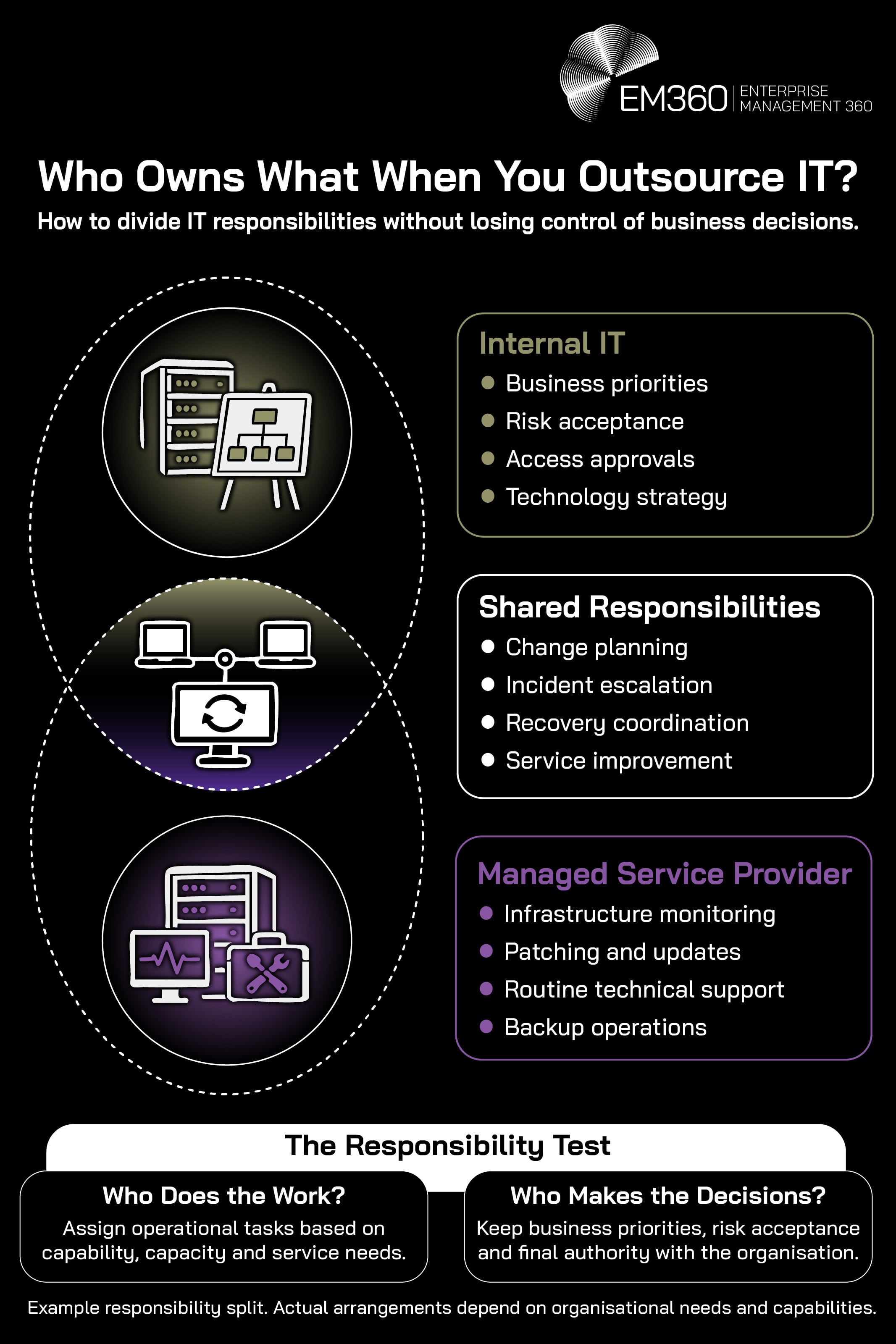
Even if an MSP does most of your IT work, there are still decisions your business needs to be involved in. These include deciding what your IT priorities are, what risks you're willing to take and whether to go ahead with changes that could affect how your business works. For example, you might ask an MSP to install software updates.
But if installing an update means restarting a system that your production team uses, you'll probably want some say in when that happens. The same goes for employee access. An MSP can set up accounts and change permissions, but your business should decide who needs access to sensitive information and who can approve it.
The UK's National Cyber Security Centre explains in its cloud shared responsibility guidance how responsibilities differ depending on the cloud services you use. It also points out that working with an MSP means another party could have access to your cloud systems. While the guidance is about cloud security, there's a useful lesson here for IT outsourcing in general.
When Facilities Go Fully Digital
How CAFM platforms turn asset, space, and energy data into a single control layer for leaner, smarter facility operations.

The person doing the work doesn't necessarily need to be the person making the decisions. You can ask an MSP to take care of everyday IT tasks while keeping control of your technology strategy, business requirements, risk decisions and major changes. It's worth writing down where those responsibilities begin and end before you start talking to providers.
Build Your IT Sourcing Responsibility Matrix
Once you've worked out what your team can handle and where they need help, you can start putting that information together. An IT Sourcing Responsibility Matrix is a simple way to assess individual services and decide whether they should remain internal, be managed entirely by an MSP or be shared between the two teams.
It won't make those decisions for you, but it'll help you organise the information you need to make them yourself.
Assess each IT capability
Make a list of the different IT services your team currently looks after. Then ask yourself five questions about each one:
- Have you got the people, skills and time to manage it?
- Would specialist knowledge or extra help make a difference?
- How well does someone need to know your business to do the work?
- What happens if the service stops working?
- Which decisions and approvals need to stay with your business?
You can use the following matrix as a starting point.
| IT capability | Internal capacity | External need | Business knowledge | Criticality | Proposed delivery |
| Service desk | Assess | Assess | Assess | Assess | Internal / MSP / Shared |
| Endpoint management | Assess | Assess | Assess | Assess | Internal / MSP / Shared |
| Cloud operations | Assess | Assess | Assess | Assess | Internal / MSP / Shared |
| Backup and recovery | Assess | Assess | Assess | Assess | Internal / MSP / Shared |
| Identity administration | Assess | Assess | Assess | Assess | Internal / MSP / Shared |
Fill in the matrix based on what your business actually needs. If you've got an experienced cloud team, for example, you might only need an MSP to monitor your cloud systems overnight. A business without those skills might need an MSP to take care of its everyday cloud operations.
You can add as many services as you need to the matrix, including network management, patching, software administration, asset management and any specialist systems your business uses.
Assign operational work and decision authority
Once you've decided who'll look after each service, work out exactly what each team will do. Simply marking something as a shared responsibility isn't enough. You don't want your IT team and the MSP both assuming the other is taking care of something. For each service, ask:
- Who does the everyday work and maintenance?
- Who steps in when something goes wrong?
- Who approves changes that could affect the business?
- Who can make urgent decisions if your employees aren't available?
- When should someone pass the work on to the other team?
Take backup and recovery, for example. You could ask an MSP to manage backups, monitor failures and carry out recovery procedures. But if several systems go down at once, your business might need to decide which ones to get working again first. You might also need to decide whether it's worth temporarily shutting down another system to help with the recovery.
By the time you've finished your matrix, you should know which services you need help with, how you want them managed and what your own team will still be responsible for. That's a much better starting point for choosing an MSP than looking through a list of services a provider offers.
When Should You Reconsider Your MSP Model?
What you need from an MSP today might be quite different from what you need in a year or two. New systems, changing workloads and different staffing needs can all change how much outside help your business needs. You might hire someone with specialist skills and decide to bring a service back in-house.
Or you might start doing business in another country and need IT support at times when your existing team isn't working. Changes to regulations, technology or the way your business works can also affect what you're comfortable handing over to someone else.
A service that was once easy for an MSP to manage might now involve more decisions that need input from your employees. Go back to your sourcing matrix whenever something changes that affects how your team manages a service. There's no reason to stick with an arrangement simply because it's the one you've always used.
Final Thoughts: Define The Work Before Choosing The Provider
Deciding what to outsource to an MSP isn't about seeing how much IT work you can hand over to someone else. It's about knowing what your team does well, where they could use some help and which decisions your business needs to keep making for itself. You might find that fully managed IT works well for some services, while co-managed IT makes more sense for others.
Once you've worked out who needs to do what, you can start talking to providers with a much clearer idea of what you need from them. You'll also find it easier to work out whether your arrangements still make sense as your business grows and your technology changes.
Working out who should look after what is just one of the challenges businesses face when managing increasingly complex IT environments. Keep up with the latest infrastructure management insights from EM360Tech to help you make informed decisions about the technology your business depends on.




Comments ( 0 )